I have always been a person that organizes his day and tasks, and I have grown, over the years, a little bit too much obsessed about scheduling and prioritizing things to do. Recently I was diagnosed as neurodivergent, and I have been introduced to the Spoon Theory, to manage energy level.
I have made a shortcut for iPhone/Mac/iPad that uses the Reminders app to get stuff done based on how much energy (spoons 🥄 ) I have at the moment, and I am sharing it with you! 😄
TL;DR: You can download the shortcut from here.
A little about Spoon Theory
If you havenever heard about The Spoon Theory, it is a metaphor created by Christine Miserandino in 2003, to describe the amount of physical or mental energy available during a day to perform tasks.
What I learned is that you might wake up one day and have a lot of energy, or another day when you are depleted entirely. Like everybody, we have things to do and those take energy. From cleaning my flat, to sending an email or doing something at work. 🥄 All of that takes energy, or spoons.
I recently started taking medications, and I found myself in a pit of despair, laying in bed and not feeling motivated to do anything. I started my day with one or negative amount of spoons. This might have been caused by the medication, but a big chunk was due to the fact that I never knew how to manage my daily amount of spoons.
Most of my spoons were taken away by social media, pressure from other people or just having a never ending list of things to do. 😦 This made me feel drained even more. I reached a point where just thinking about doing something was extremely demotivating.
I took a break from taking the pills and things did not change much. Things got better when I started scheduling my tasks on Reminders and using the Spoon Theory with my handy Shortcuts that would tell me what I can do on a specific moment. The medication started helping too, but managing the energy levels helped the most. 🎉
Apple Shortcuts to the rescue
The Shortcuts app is an obscure, and mostly unknown application, that runs on iOS, iPadOS, and macOS. It allows users to automate tasks and integrates with many apps, and OS features. My passion for automation made me create a shortcut for this specific need. Here is how it works:
I schedule (yes, with a deadline) things that I want to do on the Reminder
app. This includes stuff like cleaning my flat, groceries, sending
emails or even things like taking a relaxing shower sometimes. 😅
For each task I add a tag containing the amount of spoons (Ex: #3-spoons).
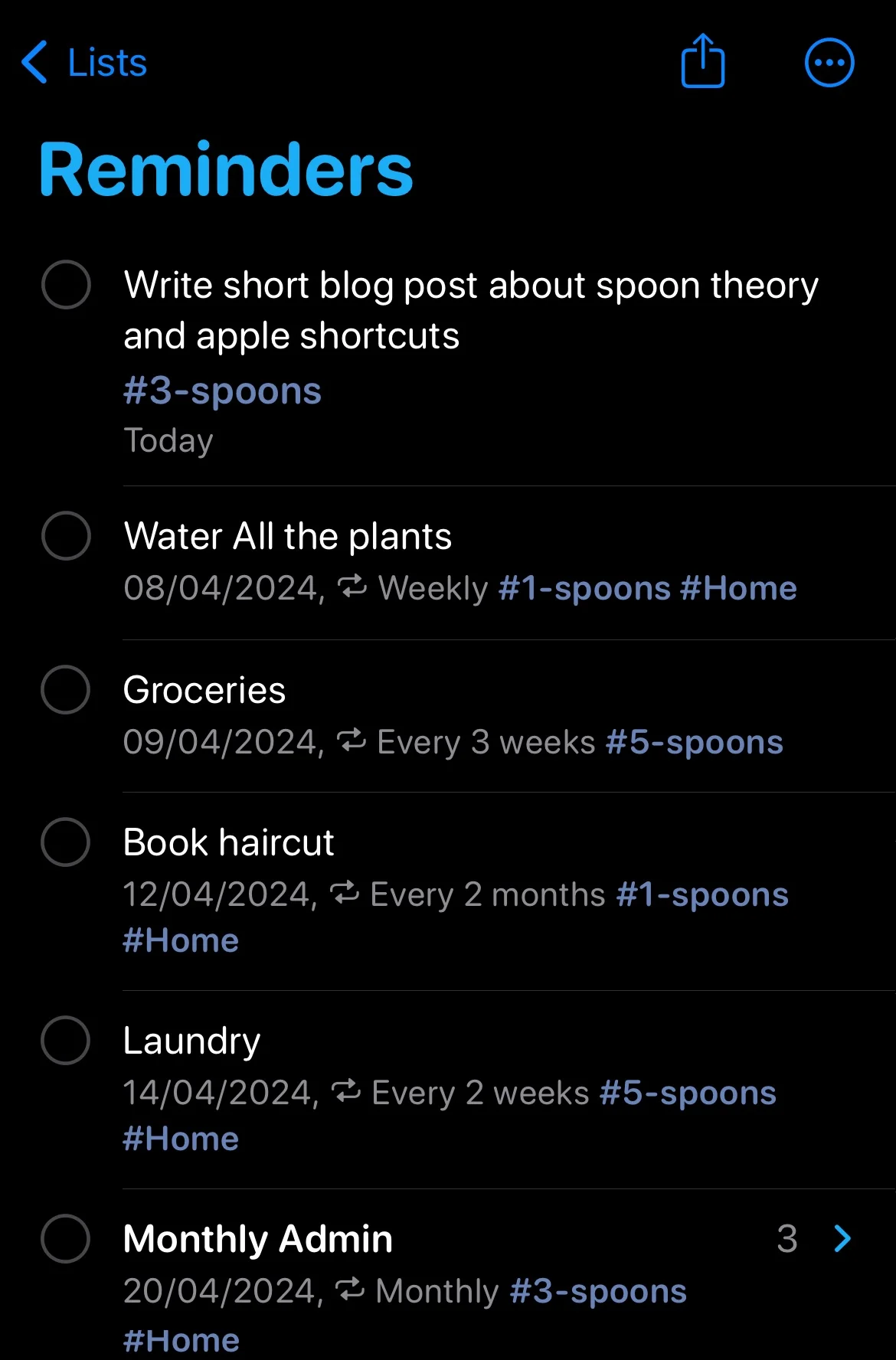
When activated, the shortcut asks me how many spoons I have today, then fetches from the Reminder app a list of upcoming tasks. With some regex magic extracts how many spoons they would take to complete. Then it tries to fit as many tasks as possible based on the amount of spoons I have available, and shows it on the screen, as well as spits it out as an output.
The reason for doing it as an output too, is that I am using the same shortcut with other shortcuts (ex: The integration with Obsidian for my second brain). This works very much like proper shell scripting, and it allows you to combine it and reuse it in more complex workflows.
You can download, inspect and use the shortcut from this link here. It works on all platforms (iOS, macOS, and iPadOS).
Things that made it work (for me)
Here are a few things that I have learned and changes I had to implement in order to make it work for me. I have added comments in the flow about those.
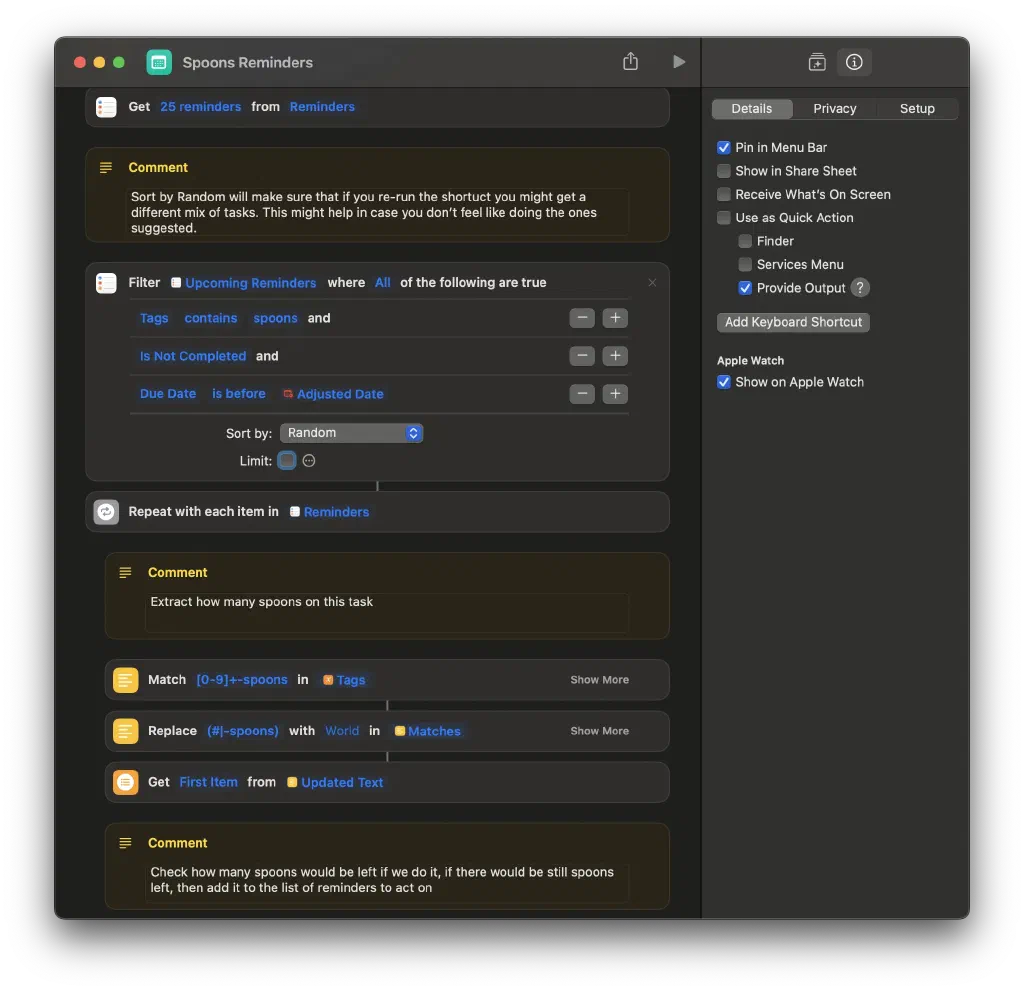
At the beginning I was creating reminders without any deadline. This gave me a lot more anxiety than needed, and the shortcut was not helping at all. Seeing and doing all the tasks together did not help. The solution was to schedule, and think about when I could do something, so that I don’t get to do too many things in one day and exhaust spoons. Taking a break and do a little every day works for me.
Setting the order to random instead of sorting by priority was important. Sometimes I don’t feel like acting on things, as the amount of spoons that some tasks are required varies from day to day. Having a random order allows me to re-run the shortcut so that I might get a different output every time. If I don’t feel like doing something, I pick something else!
Not knowing how many spoons a specific tasks would take (even if I had set it up myself) made me not stress about it. Knowing how much energy and spoons they will consume, made it harder for me to feel motivated. That is why the text displayed does not show how many spoons each activity will take.
Conclusion
I hope that this shortcut helps other people the same way it helped me. I think this is a small thing. It does not require a dedicated ToDo list, or to pay for a specific app. You don’t need an app for that, a shortcut is fine. You can download my shortcut here.
If you find this shortcut useful, please let me know on mastodon! ❤️ 😄 I would appreciate it a lot knowing that you are using it and even adapting/editing it to your own needs!